Android smartphones have become more powerful than ever in 2026. From AI-powered tools to productivity apps, video editing platforms, gaming utilities, finance trackers, and privacy-focused software, Android users now have access to millions of useful applications on the Google Play Store.
But with so many apps available, finding the truly useful ones can be difficult.
Some apps improve productivity, while others help with:
- Photo editing
- Video creation
- Learning
- Fitness
- Communication
- Security
- Entertainment
In this article, we explore the best Android apps for 2026 across different categories that are actually worth downloading.
Why Android Apps Matter More in 2026
Modern Android apps now use:
- Artificial Intelligence
- Cloud synchronization
- AI automation
- Real-time collaboration
- Advanced personalization
These apps help users:
- Save time
- Increase productivity
- Improve creativity
- Stay organized
- Learn faster
Smartphones are now replacing many traditional computer tasks.
What Makes an Android App Great?
Before downloading an app, users should consider:
Important Factors
- User experience
- Speed and optimization
- Privacy and security
- Useful features
- Battery efficiency
- Regular updates
The best apps combine performance with simplicity.
1. Notion – Best Productivity App
Notion remains one of the most powerful productivity apps in 2026.
Features
- Note-taking
- Task management
- AI writing assistance
- Team collaboration
- Project planning
Why It’s Popular
Students, professionals, and creators use Notion to organize:
- Daily schedules
- Projects
- Study materials
- Work tasks
Best For
- Students
- Remote workers
- Content creators
Pros
- Powerful customization
- AI tools
- Excellent organization features
Cons
- Can feel overwhelming for beginners
2. CapCut – Best Video Editing App
CapCut continues dominating mobile video editing in 2026.
Features
- AI editing tools
- Auto subtitles
- Cinematic transitions
- Background removal
- Beat synchronization
Why Creators Love It
It helps users create professional-quality:
- Reels
- Shorts
- TikToks
- YouTube videos
directly on mobile.
Pros
- Beginner-friendly
- Powerful AI tools
- Free features
Cons
- Some cloud tools require internet connection
3. Canva – Best Graphic Design App
Canva has become essential for content creators and businesses.
Features
- Social media templates
- AI image generation
- Logo design
- Presentation tools
- Video editing
Best For
- Instagram creators
- Students
- Small businesses
- Freelancers
Pros
- Extremely easy to use
- Huge template library
- Fast editing tools
Cons
- Some premium templates locked behind subscription
4. Spotify – Best Music Streaming App
Spotify remains one of the best entertainment apps for Android.
Features
- AI playlists
- Podcasts
- Personalized recommendations
- Offline downloads
Why It’s Great
Spotify’s recommendation system is among the best in the industry.
Pros
- Excellent music discovery
- Huge music library
- Smooth interface
Cons
- Ads in free version
5. ChatGPT – Best AI App
AI apps are becoming essential in 2026.
What It Can Do
- Answer questions
- Generate ideas
- Help with writing
- Study assistance
- Coding help
Best For
- Students
- Writers
- Professionals
- Learners
Pros
- Extremely versatile
- Saves time
- Useful for learning
Cons
- Some advanced features require subscription

6. Google Photos – Best Photo Backup App
Google Photos remains one of the best Android apps for managing photos.
Features
- AI photo organization
- Cloud backup
- Face recognition
- Smart search
Why Users Love It
Finding old photos becomes incredibly easy.
Pros
- Excellent AI organization
- Automatic backup
- Easy sharing
Cons
- Limited free storage
7. Snapseed – Best Free Photo Editing App
Snapseed still offers professional editing tools completely free.
Features
- RAW editing
- Selective adjustments
- Professional filters
- Healing tools
Best For
- Mobile photographers
- Instagram users
- Beginners
Pros
- No ads
- Powerful editing tools
- Completely free
Cons
- Interface feels slightly outdated
8. Microsoft SwiftKey – Best Keyboard App
Typing efficiency matters a lot on smartphones.
Features
- AI predictions
- Multi-language typing
- Clipboard management
- Swipe typing
Why It’s Useful
SwiftKey improves typing speed and accuracy significantly.
Pros
- Excellent predictions
- Smooth typing experience
- Customizable themes
Cons
- Some users prefer stock keyboards
9. Duolingo – Best Learning App
Duolingo makes language learning simple and fun.
Features
- Gamified learning
- Daily streaks
- AI learning suggestions
- Multiple languages
Best For
- Students
- Travelers
- Beginners
Pros
- Fun interface
- Easy lessons
- Good beginner support
Cons
- Advanced fluency requires additional practice
10. Google Keep – Best Simple Notes App
Google Keep remains perfect for quick note-taking.
Features
- Voice notes
- Checklists
- Reminders
- Cloud sync
Why It’s Popular
It is lightweight, fast, and easy to use.
Pros
- Extremely simple
- Fast syncing
- Great reminders
Cons
- Limited advanced features
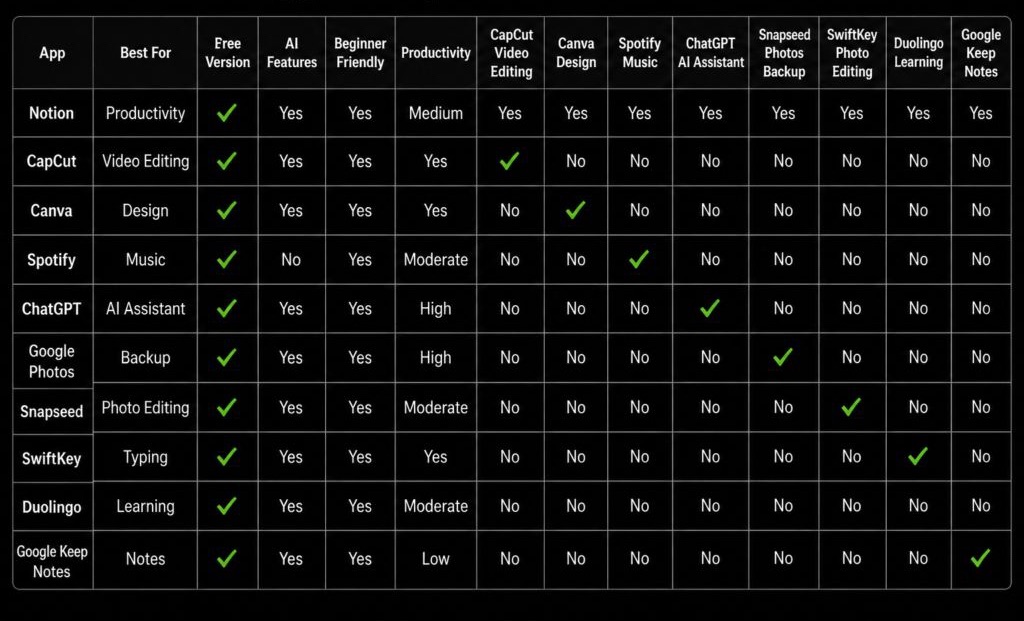
Best Android Apps Comparison Table
Best Android App for Students
Recommended Choice
Notion + ChatGPT
This combination helps students:
- Organize notes
- Learn faster
- Improve productivity
Best Android App for Content Creators
Recommended Choice
CapCut + Canva
These apps help creators produce:
- Reels
- Shorts
- Thumbnails
- Social media posts
professionally.
Best Android App for Productivity
Recommended Choice
Notion
It combines:
- Notes
- Task management
- AI tools
- Project planning
in one platform.
Best Free Android Apps in 2026
Some of the best free apps include:
- Snapseed
- CapCut
- Google Keep
- Canva
- Duolingo
These apps provide huge value without requiring payment.
AI Is Changing Android Apps
AI integration is becoming the biggest trend in mobile apps.
AI Features Now Include
- Smart editing
- AI writing
- AI search
- AI recommendations
- AI photo cleanup
Apps are becoming increasingly intelligent and automated.
Tips Before Downloading Apps
Users should:
- Check permissions carefully
- Avoid unknown apps
- Read reviews
- Download from official Play Store only
Privacy and security remain extremely important.
Common Mistakes Android Users Make
Many users:
- Download too many apps
- Ignore app permissions
- Use outdated apps
- Install unnecessary cleaners
Too many apps can reduce phone performance.
Best Phones for Android Apps in 2026
Modern flagship phones handle apps more smoothly.
Recommended Phones
- Samsung Galaxy S26 Ultra
- OnePlus 15 Pro
- Google Pixel 10
These devices offer:
- Better performance
- AI optimization
- Faster multitasking
Future of Android Apps
Future Android apps will focus heavily on:
- AI automation
- Personalization
- Cloud integration
- AR experiences
- Voice interaction
Apps will become smarter and more adaptive.
Final Verdict
Android apps in 2026 are more powerful and useful than ever before. Whether you want better productivity, AI assistance, professional video editing, learning tools, or entertainment, there are excellent apps available for every type of user.
Apps like Notion, CapCut, Canva, ChatGPT, and Google Photos continue leading their categories because of their powerful features, smooth performance, and AI integration.
Choosing the right apps can dramatically improve your smartphone experience and help you work smarter, learn faster, and create better content.